GuardingWP Research · Edition 01
The State of WordPress Security 2026
What 1,981 site scans across 40+ verticals reveal about how WordPress is configured in the real world.
Published 16 May 2026 · Free, no registration
Executive summary
We scanned 1,981 sites spanning regional press, e-commerce, foundations, universities, agencies, podcasts, recipe blogs, and dozens of other verticals — across English, Dutch, German, French, Italian, Spanish, Portuguese, Japanese, Korean, Indonesian, Hindi, Arabic, and more. Of those, 424 were confirmed WordPress sites that responded normally to a public scan. This report aggregates what those scans found.
The picture is consistent: the average WordPress site in the wild is held together by good-enough defaults and a thin layer of plugin updates. It's not catastrophic. But it's not where you'd want a public-internet platform to sit either.
Five things that stood out:
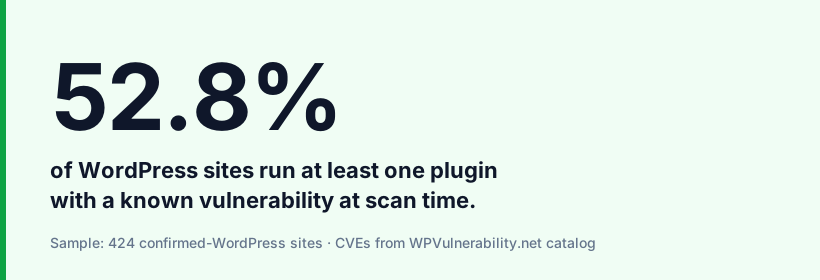
- 52.8% of WordPress sites are running at least one plugin with a known CVE at scan time. Not a hypothetical risk — a documented vulnerability with a patch already published, sitting unpatched on the live site.
- 55.9% leak their WordPress version through the generator meta tag. That single string is what version-targeted attack campaigns search for.
- 93.2% are missing one or more modern security headers (HSTS, CSP, X-Frame-Options). Defaults from a 2015 web are still the default in 2026.
- 35.8% have XML-RPC still enabled. The classic brute-force surface that most sites no longer need.
- 15.9% of version-disclosing sites are on an outdated, unsupported WordPress branch (pre-6.5). They aren't getting security backports anymore.
None of these are unfixable. Most are 10-minute jobs. The reason they persist is that nothing breaks visibly when you ignore them — until it does.
Methodology — read this first
Corpus. We hand-curated 1,981 sites across two rounds: round 1 prioritized major publishing, e-commerce, agencies, foundations, and SMB across 30+ verticals; round 2 focused on long-tail regional press, universities (department subdomains), municipal sites, religious institutions, recipe blogs, plugin/theme makers, podcast networks, and creator personal sites — leaning into the niches where WordPress has documented market share above 40%.
Scanner.GuardingWP's open scanner — the same one anyone can use at guardingwp.com. It does only what Googlebot does: public HTTP GET with a branded User-Agent. No exploit attempts. No authentication probing. No personal data captured. Equivalent to a security-aware visitor reading the site.
Checks. Eleven core configuration checks (version exposure, security headers, login surface, XML-RPC state, etc.) plus plugin fingerprinting against the public WPVulnerability.net vulnerability catalog.
Analysis population. Of the 1,981 sites scanned:
- 424 (21.4%) were confirmed WordPress installs that responded normally — the analysis population.
- 474 (23.9%)returned a WAF challenge (Cloudflare, Imunify360, Sucuri, etc.) and were dropped — the scan can't see past a challenge page.
- 160 (8.1%) were unreachable (DNS failures, timeouts, dropped connections) — dropped.
- The remaining 923 were either not running WordPress or running it behind a CDN that strips WP fingerprints — also dropped from this analysis.
Selection bias.The corpus over-represents publishing, agencies, foundations, education, and SMB — sectors where WP has documented >40% market share. Enterprise-grade sites behind aggressive WAFs are under-represented (they get dropped from the dataset rather than studied). Read the numbers as “what a typical WP site looks like in the publishing/SMB/long-tail world,” not “what every WP site looks like.”
We do not name individual sites.Every number in this report is aggregate. Naming sites publicly would risk lawsuits, reputation harm, and — more importantly — wouldn't change the underlying picture. The patterns are what matter.
Snapshot date: May 2026.
Section 1
Visibility — what your WordPress install reveals about itself
The first thing a targeted attack does is fingerprint the target. The second thing is match that fingerprint against a database of known vulnerabilities. Most WordPress sites help with step one.
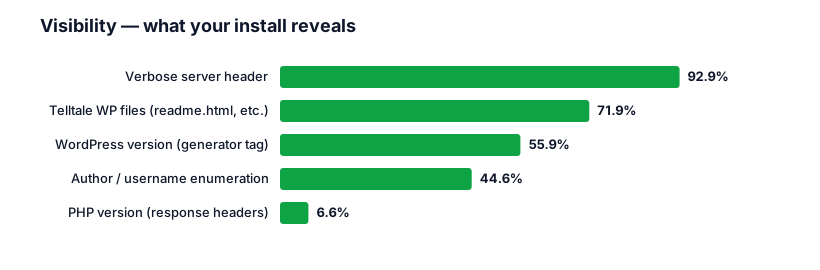
The generator tag is the cleanest signal: a single <meta name="generator" content="WordPress 6.8.3"> in the HTML head tells an attacker exactly which subset of vulnerabilities to try. Targeted brute-force, credential-stuffing, and version-matched exploit campaigns all start here.
Telltale files do the same thing through a different door. A 200 response on /readme.html or /license.txt is a confirmation pulse — “yes, this is WordPress, and here's the version number from the README header.”
Author enumeration (44.6%) is less talked about but more useful to attackers than its reputation suggests. A request to /?author=1 that redirects to /author/admin-username/ hands over a real WP username. Combined with an exposed login page, the attacker now knows half of every credential they need to try.
The fix is configuration, not patching. Remove the generator tag (one filter), block readme.html and license.txt (server config or security plugin), disable author redirects (one filter), strip the server header (server config). None of these break anything. They just make your install look generic — which is the point.
Section 2
Configuration hygiene — the defaults are the problem
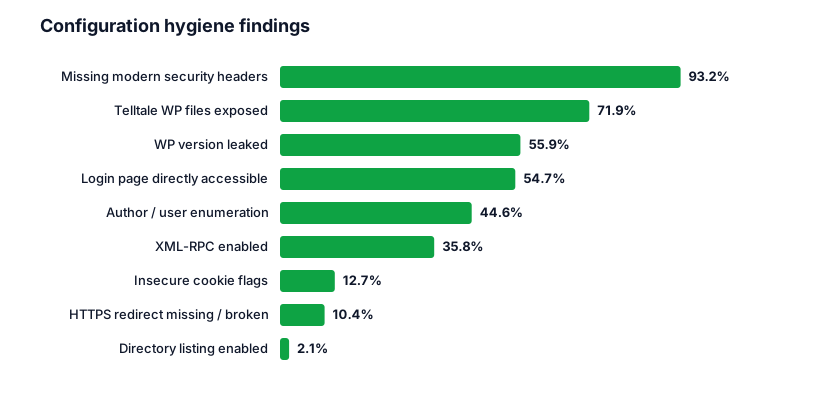
93.2% are missing security headers. Strict-Transport-Security (HSTS), Content-Security-Policy (CSP), X-Frame-Options, X-Content-Type-Options. None of these patch a vulnerability. They tell browsers how to protect your visitors from a wide class of attacks — clickjacking, MIME sniffing, mixed-content injection, downgrade attacks. They're free, they ship as one configuration block, and almost no one ships them.
54.7% have /wp-login.php exposed. No rate limiting, no IP allowlist, no two-factor, nothing. A bot doesn't need a vulnerability to brute-force a login page; it just needs the page to keep accepting attempts. Most successful WordPress compromises are not exploits — they're successful guesses.
35.8% still have XML-RPC enabled. XML-RPC was the backbone of remote WordPress publishing and Jetpack-style integrations a decade ago. Almost no one uses it directly now. But it's still on by default, and it's still a brute-force amplifier: one XML-RPC system.multicall request can attempt hundreds of credentials in a single hit. Patching XML-RPC means turning it off — or, if you genuinely need it, scoping it to known IPs.
Directory listing (2.1%) is the rarest find.Modern shared hosting almost universally disables it by default. The 9 sites where we found it weren't hobby sites — they were small businesses on managed hosts where someone, somewhere, flipped Options +Indexes and forgot.
Section 3
The plugin landscape — and the CVEs sitting in it
52.8% of WordPress sites in our analysis are running at least one plugin with a known vulnerability at scan time.
That's the number that should anchor any discussion of WordPress security. Not “WordPress is insecure” — WordPress core is, in 2026, one of the more carefully maintained CMSs in production. The risk lives in the plugin layer. And the plugin layer is where most sites lag the patch cycle.
Top 10 plugins detected across the dataset
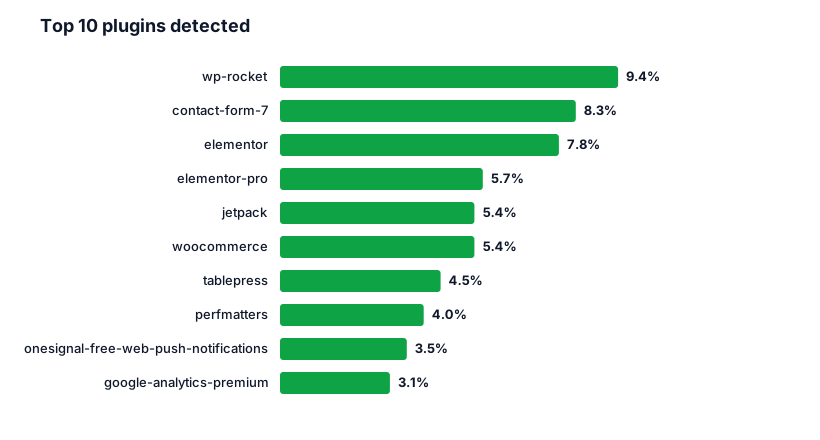
This is broadly the landscape you'd expect: caching, forms, page builders, commerce, and notifications. Each of these plugins is well-known, actively maintained, and patches vulnerabilities promptly. The problem isn't the plugins. It's the gap between the patch shipping and the site updating.
Most-installed vulnerable plugins (CVE in catalog at scan time)
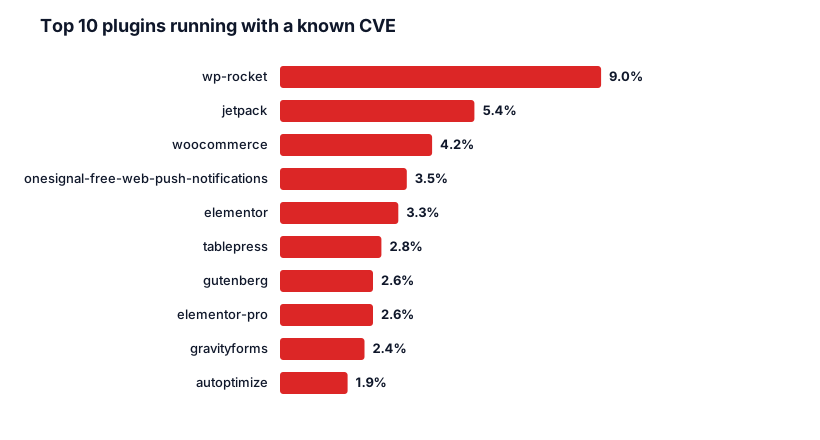
These are almost the same plugins as the “top 10 detected” list. That isn't a coincidence — it's a structural feature of the WordPress ecosystem: the most-used plugins ship the most patches, and the long tail of sites trails by months or quarters. A site running wp-rocket is statistically likely to be a site running an outdated wp-rocket.
The fix here is automation, not vigilance. Auto-updates for plugins close most of this gap. A staging environment that re-runs the test suite after each auto-update closes the remaining risk.
Section 4
WordPress versions — most are current, a stubborn minority is not
WordPress version was disclosed by 157 of the 424 WP sites in the analysis population (37.0%). The distribution of that disclosure population:
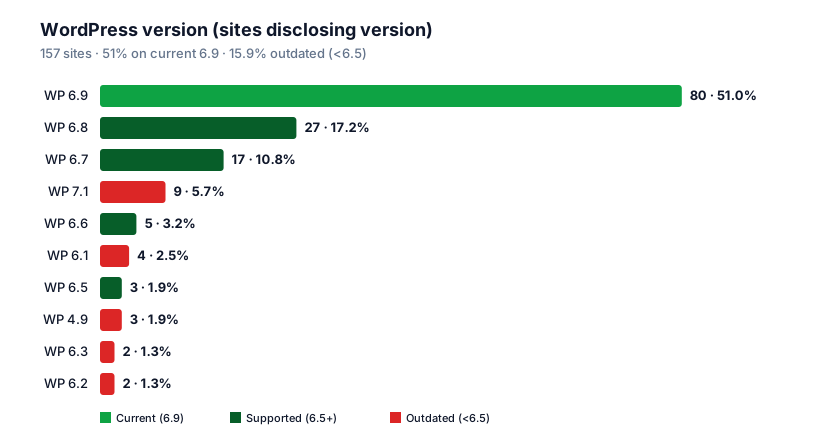
51.0% are on the current 6.9.x branch.That's a healthier picture than WordPress security writeups from five years ago. Auto-updates for core have done what they were meant to do.
84.1% are on a supported branch (6.5 or newer) — receiving security backports.
15.9% are on an unsupported branch.That's the long tail — sites still on 6.1, 5.9, 4.9, 4.7. They're not getting security fixes. Anything published after their branch was deprecated is unpatched on their install. The 4.9 sites (last release in 2020, end-of-life 2022) are essentially abandoned installs that are still serving traffic.
Sidebar: a small cluster of nine sites reports “WordPress 7.1” — a version that doesn't exist. Almost certainly spoofed generator strings (security through obscurity, or platforms forking WP and rebranding). Not a security risk on their own, but they confuse fingerprinting.
Section 5
Hosting and performance
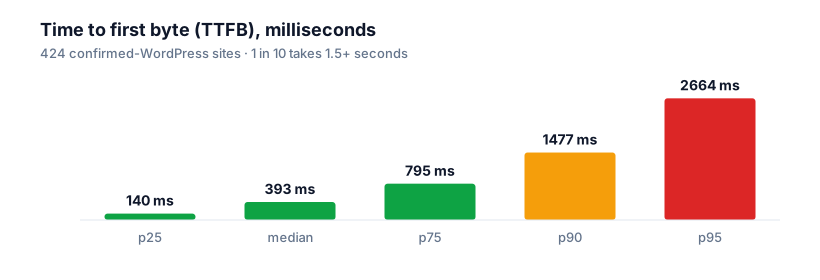
A median TTFB approaching 400 ms is fine for a content site. The 90th and 95th percentiles tell a different story: roughly one in ten WP sites takes 1.5+ seconds before the first byte of HTML reaches the browser, and one in twenty takes nearly three seconds. Slow-hosting flag triggered on 35.1% of sites.
Cloudflare fronts almost half the sites that disclose a server header (194 of 394). That's a useful structural fact: many of the “configuration” findings in this report (HSTS, CSP, X-Frame-Options) are trivially fixable at the Cloudflare layer for those sites — Cloudflare's Transform Rules inject any header you want, and they apply before the browser sees the response. The fact that 93.2% are missing those headers despite ~50% being on Cloudflare suggests the gap is “didn't configure it,” not “couldn't configure it.”
Section 6
Score distribution — most WordPress sites score a C
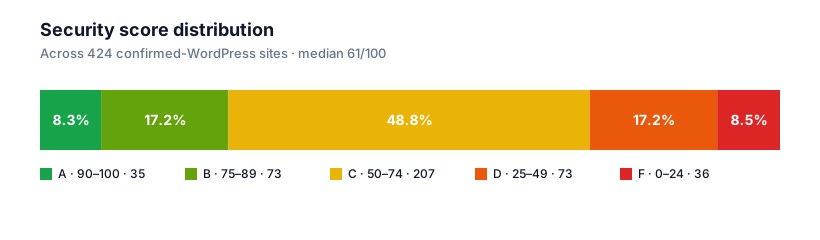
Median: 61 / 100. 25.7% score below 50. 8.3% score 90 or above.
A 61 median is exactly where you'd expect — most defaults disabled, most plugins reasonably current, most servers shipping reasonable but not modern headers, no active hardening. A C means “no obvious red flags, no active attention either.” That describes the bulk of the WP installed base.
The 8.3% A-tieris a small group: sites where someone deliberately hardened the configuration, almost always because they had an incident or hired someone who'd seen one. The interventions that take you from a 61 to a 91 are mechanical. They take an afternoon, not a project.
The 8.5% F-tier is the inverse: older installs with an outdated WP core, an outdated plugin or two with active CVEs, and no security-header layer at all.
What to do with all of this
If you're running WordPress, the actionable list out of this dataset is short:
- Remove the generator tag, block
/readme.htmland/license.txt, disable author redirects. Five minutes, hides your install from version-matched targeting. - Enable plugin auto-updates in the admin (or set
add_filter('auto_update_plugin', '__return_true');in a custom plugin). Closes the 52.8%-with-vulnerable-plugin gap over the next few weeks of patches. - Turn off XML-RPC unless something on the site actively uses it.
- Add HSTS, CSP, X-Frame-Options, X-Content-Type-Options at the server or CDN layer. One config block.
- Protect /wp-login.php — rate limit + 2FA at a minimum.
- Keep WP core on the supported branch (6.5 or newer). Auto-updates for core have been enabled by default since 5.6.
If you've done all six, you're in the top 8.3% — A-tier — of WordPress sites in the wild.
See which of these your site fails on
Same scanner that produced this report. Free, 30-second result.
Scan your site →Appendix — full check catalog
| Check | Tests for | Sites flagged |
|---|---|---|
| generator_tag | WP version in <meta generator> | 237 · 55.9% |
| php_version_exposed | PHP version in response headers | 28 · 6.6% |
| server_header | Server software + version in Server: header | 394 · 92.9% |
| directory_listing | Auto-generated file index on a directory URL | 9 · 2.1% |
| exposed_files | /readme.html, /license.txt, etc. returning 200 | 305 · 71.9% |
| xmlrpc_enabled | /xmlrpc.php live and accepting requests | 152 · 35.8% |
| https_redirect | HTTP → HTTPS redirect missing or broken | 44 · 10.4% |
| insecure_cookies | Session cookies missing Secure / HttpOnly | 54 · 12.7% |
| login_exposed | /wp-login.php accessible without rate limit | 232 · 54.7% |
| security_headers | Missing HSTS/CSP/X-Frame-Options/etc. | 395 · 93.2% |
| user_enumeration | /?author=1 redirect leaks a real username | 189 · 44.6% |
Plugin vulnerability findings are sourced from the public WPVulnerability.net catalog, matched against fingerprinted plugin slugs and versions detected in the site's HTML and asset URLs.
About this report
Produced by GuardingWP — a WordPress security scanner. We run free scans for anyone at guardingwp.com, and a paid product that automates weekly scans for site owners and agencies who'd rather not check by hand.
This is the first edition of an annual State of WordPress Security report. The dataset, methodology, and scanner are open in the sense that anyone can reproduce them: the scanner is publicly accessible, the corpus is selectable from any source list of public WordPress sites, and the analysis script is straightforward.
Comments, corrections, methodology questions: hello@guardingwp.com.
Download the full report as PDF
Designed for offline reading and citing. Free, no registration, no email gate.
Download PDF →